

Turn any video
into
broadcast-ready
subtitles.
- Transcription accuracy
- 98.7%
- Editing
- 4× faster than typing
- Languages
- 60+
- Users
- 5,000+
Used by teams at





Every line
broken right.
Every cue on time.
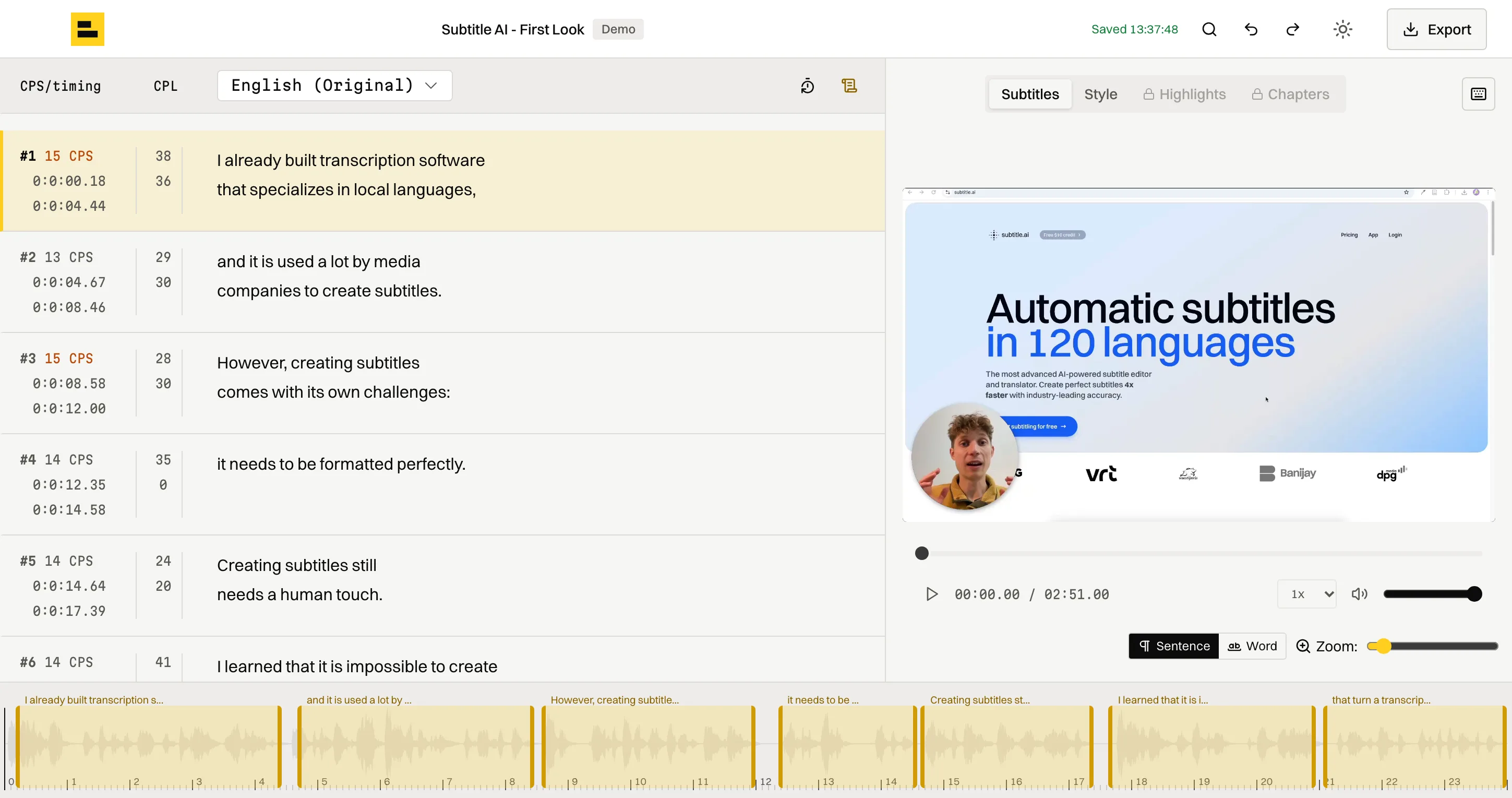
Transcription is the easy part. The work is in the formatting: where a line breaks, how long a cue stays up, whether anyone can read it in time. Subtitle AI does that part too, to your rules. Switch presets and watch the same interview re-cut.
10:00:00:16
6 cues · longest line 42/42 · 5 ok · 1 fastSample dialogue · generated timings
- Line length
- 42 characters by default. Set anything from 20 up, per project or as a saved preset.
- Lines per cue
- Two by default, three for podcasts, up to four in a preset of your own.
- Reading speed
- Every cue is checked in characters per second, spaces excluded, and flagged when it runs fast.
- Timing
- Three frames between cues by default, with optional minimum and maximum durations.
- Speakers
- A new speaker gets a dash, so two short turns can share one cue.
- Vocabulary
- Names, places and jargon spelled your way, from a custom vocabulary.
Documentaries,
news clips,
radio shows
and archives.
 EBU-STL · 25 fps
Deliver a film or documentary to spec
- In
- Video or audio master
- Rules
- Your preset: CPL, lines, gaps
- Out
- EBU-STL · SRT · TTML
Illustrative sample · stills and file names are examples
The AI drafts.
You sign off,
at the speed
of your keyboard.
Every cue shows its reading speed and line lengths while you edit. Move cue to cue or word to word, set in and out points and add cues at the playhead without reaching for the mouse. It's 4× faster than typing subtitles by hand.
app.subtitle.ai/demo
Hotkeys
- Play or pause
- Esc
- Jump 5 seconds
- ⌘← →
- Seek precisely
- Shift← →
- Previous or next cue
- ⌘↑ ↓
- Previous or next word
- Shift↑ ↓
- Set in point
- ⌘ShiftI
- Set out point
- ⌘ShiftO
- New cue at the playhead
- ⌘Enter
⌘ is Ctrl on Windows and Linux.
Open the demo project, no account neededYour footage
stays yours.
- Stored in the EU
- Your files, database and our servers are in Paris, and our main speech-recognition provider works in the EU.
- Deleted when you say so
- Deleting a project removes the original and every file made from it.